• About

LIVEdigitally

Category Archives: Mobile Technology

How Verizon Could Improve Their Mobile Gaming

Posted on August 28, 2008 by Jeremy Toeman

As a long-time Verizon Wireless customer (originally back with GE!), I must say I’m generally quite happy with my service. My bill is a tad high, but then again we have 2 phones with lots of minutes, a Family plan and full access in the US and Canada, thus offsetting our home phone bill (~$10/mo for a landline). During my daily busride, I like to play games on my phone (Samsung SCH-U740 – awesome). I think Verizon may have created one of the best platform potentials but laden it with one of the worst user experiences I’ve ever seen.

In my phone menu, going to Games, then Get New App gives me a fairly easy set of options. I can instantly buy one of their top 2 games/promotions, or browse through categories to find what I want. The categories are pretty self-explanatory, and that’s about where the usability ends.

Picking a game brings you to a screen with three options: Subscription price, Unlimited price, and Info. On a rare occasion there’s also the option for a Free Trial, but we’ll ignore that for now. Let’s presume that I pick an interestingly named title, for example “Stranded: A Game of Survival” ($2.99 Sub, $7.99 Unl). Clicking “info” shows me the following text:

You awake Stranded on a mysterious island with other survivors. You discover that not everyone can be trusted. Will you escape? Without a price plan that includes an unlimited data feature, you will incur either (depending on your plan) airtime charges at applicable overage rates if you exceed your minutes bundle or megabyte (“MB”) charges of $1.99/MB for downloading the application. Some applications may result in additional charges for sending/receiving data during use. [Size:479KB]

First of all, I don’t know anything about the game! This category (strategy games) includes things ranging from Command and Conquer to Triple Scoop Twist, so there’s no information about gameplay. Is it a RTS? An RPG? A puzzle? Etc. Interestingly the website has nice screenshots and much more text describing the game itself. Why isn’t this available in the game page on the phone when I’m considering a purchase?  Even the website descriptions are lacking the specifics I’d want to know to make a decision.

Second, the data usage warning is terrible. I get that they want to warn me about a potential charge, but how is the text they use going to help? I don’t know if the app actually uses airtime/minutes to play, or if that’s just for the download itself! I understand it is a lot of extra work to figure out a user’s plan in real-time (well, no, I don’t *really* understand it, but I’ll give them the benefit of the doubt), but a simple clarification of the English would be swell.

Finally, I think a lot more free trials would sell me a lot more applications. I’ve downloaded several of the ones that give me a free level to play, or a few minutes of playtime, and have actually purchased one game as a result. I am a big believer in putting some bait on the hook, as opposed to just throwing a hook in the water and saying “here fishie fishie fishie!”  Especially considering Verizon’s Get-It-Now system is a complete walled garden, I don’t think there’s a way to “steal” a game even if I wanted to!

For the record, I’ve purchased the following games: Sudoku (good version too), Diner Dash (fun, but a bit repetitive), Call of Duty 4 (I’m such a sucker, though it was simple and fun), Transformers (not much more than meets the eye), and Townsmen 3 (meh).  I’d really like to have a very simple Ultima-style RPG (think Ultima 2 or 4) that can be played in short, bite-sized amounts of time.  It doesn’t look like I’ll be able to figure it out even if I find one, but one can always hope…

Posted in Gaming, Mobile Technology | Tags: Gaming, mobile, samsung, verizon | Leave a comment |

Liberal Media Deals In Lies: NYT Rewrites iPhone History

Posted on August 15, 2008 by Guest Contributor

The NYT feeds the Android/T-Mobile hype machine with a fairly tepid press-release-dressed-up-as-an-article, but this utterly craptastic piece of “analysis” cannot go unchallenged:

Apple’s iPhone has shaken the cellphone industry, partly because of its design, but mostly because AT&T and Apple have allowed owners to download any number of applications to their phones. That freedom to individualize a phone’s functions has helped increase the popularity of the iPhone.

Ummm, NO! Sure, the iPhone shook the celphone industry despite warnings (like this one from Palm CEO Ed Colligan) that making phones is hard and “PC guys are not going to just figure this out. They’re not going to just walk in.” But the iPhone launched without extensibility or third-party apps.

The iPhone began life as a closed platform. In January of 2007, Steve Jobs said “You don’t want your phone to be an open platform”. There were always plans to open the platform up, but for the majority of the time iPhones have been on this earth, if you wanted to put new programs on your iPhone, you had to jailbreak it. It wasn’t until recently, after a great deal of fear, uncertainty, and drama, that the iPhone platform was opened to outside development.

To say that the iPhone shakes the industry “mostly” because of its extendibility is demonstrably false. It shakes the industry because its a well-designed, well-integrated product in a market sector that’s gotten away with producing staid, nigh-unusable garbage for way too long. Which is why the article in question is so offensive – there’s plenty of opportunity for Google/Android ahead, and tons of other areas to focus on the notion of customer freedom. Why force-fit this story about the iPhone when it just isn’t needed?

Here’s to hoping that Google’s introduction of the Android platform will provide Apple with a worthy competitor—and push the industry to develop 21st century phones.

Posted in Gadgets, Mobile Technology, That's Janky | Tags: android, iphone, media | Leave a comment |

Blippr tackles micro reviews – micro keeps getting bigger

Posted on August 9, 2008 by David Speiser

On a scale of 1 to 10, I think Blippr is pretty cool.

Blippr is a review service; you write short-form reviews of all kinds of things (books, movies, etc.)  In an oxymoronic set of circumstances that only the Internet can enable, “micro” services are becoming huge.  Twitter started a couple of years ago, and has become a popular (in the Valley, not in Kansas) “micro-blogging” service.  In 140 characters or less you give your followers a status update.  Some people use this for life-casting (i.e. I’m going to get a burrito) and others for starting conversations (i.e. what are the chances that Vista will stop sucking?).  In my opinion, the latter is a much more interesting use for the service.

Twitter is about “micro-blogging” because they have a strict limitation on your content – all posts must be 140 characters or less.  That’s as opposed to say WordPress, which is unlimited blogging (gurgitate to your heart’s content).   12seconds (which we’re involved in directly and which we posted about last month) also imposes a user constraint (twelve seconds, in case that wasn’t obvious.)  Blippr follows suit with a constraint of their own, 160 characters or less.

Erick Schonfeld at Techcrunch wrote an article about Blippr a couple of weeks ago, which offers a fine summary of the product.  I just signed up for an account myself – want to be friends?  So far I’ve reviewed a couple of movies, Dark Knight and 300.  Blippr encourages reviews for all kinds of products, including movies, music, games, books, and more.  The restraints force you to be choosy with your words and even your characters.  (Might want to start liking the ampersand.)

I see lots of opportunities in this product to link out to other products and services, whether amazon book and music purchases, netflix movie rentals, booksfree book rentals, social networks likes Shelfari, Facebook, and more… the list is more or less never-ending.  Some of those deals could include affiliate deals that might even generate revenue, which is always a nice little bonus in an internet company.

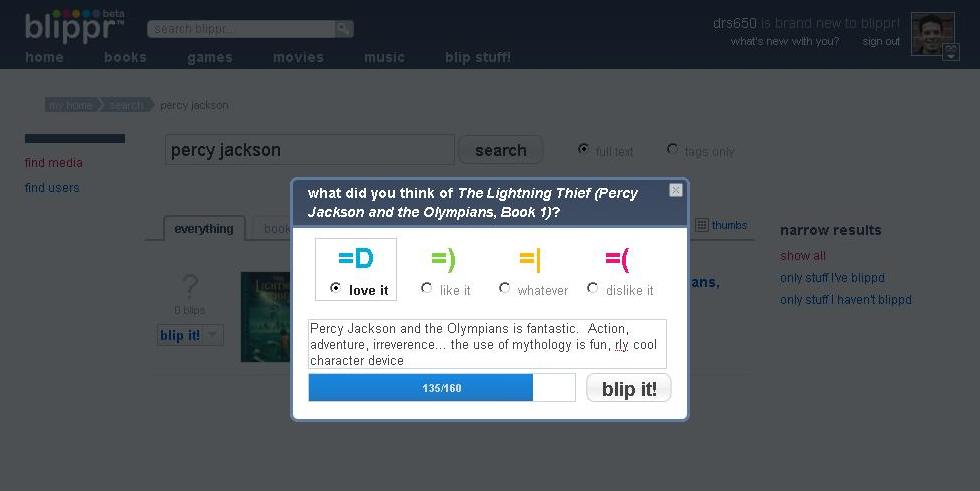
I like the UI in Blippr.  When you type out a review, a blue bar below the text window indicates how much space you have left.  Where Twitter uses a numeric counter (which turns red and features a minus sign when you pass 140), I think the visualization of the blue bar is effective and more interesting to watch.

Blippr’s also done a great job of integrating other services; it’s quite easy to link your blips to your Twitter stream, to your FriendFeed, and to a myriad of other services.

There are a number of things I think BLippr could improve upon – doubtless they’ve considered these already, but I’ll voice them anyway.  I think it would be cool if you could embed blips, make a widget out of all my blips, specific genres of blips, etc.  It’d be nice to have the option to embed them directly on my blog, on a profile page, etc.

Also, SMS integration makes a lot of sense.  According to tehir Get Satisfaction page, that’s coming soon.  I can see a great deal of utility to that feature, especially in regards to a spontaneous interaction with something or other (i.e. I just walked out of Indiana Jones 4, and I’m so offended by the refrigerator scene that I want to tell the world RIGHT NOW!)  I get it, they don’t have the money / resources / infrastructure / developers etc.  yet.  But they need to add SMS soon.

I also think this is an appropriate complement to Yelp, and other restaurant / business review services.  I’d like to see them expand their focus (or create a sister service) that is dedicated to that market.   And lastly, outside access seems really important to me.  How can I dip into the Blippr-o-sphere on my mobile handset when I’m in line at the movie theater and the movie I wanted to see is sold out?  Or I am at Green Apple Books (Clement and 6th in San Francisco, check ’em out) and I want someone’s opinion on a book.  A short, to-the-point opinion.

Overall, I think this service shows more promise than most “web 2.0” (god I hate that term) companies.  I’m interested to see where it goes.  To the right I’ve embedded a screenshot of my (considerably) shorter review of Blippr, using Blippr.  Neat.

This is also posted at 1to10reviews.

Posted in Mobile Technology, Web/Internet | Tags: 12seconds, blippr, micro reviews, micro-blogging, Product Reviews, twitter | 2 Comments |

The iPhone 3G proves that there is no economic downturn

Posted on July 15, 2008 by Guest Contributor

$4 gas (in the northeast, anyway), bank collapses, sluggish economic growth, pundits predicting recessions, bear markets, $140 oil, $900 gold, rampant foreclosures, and a plummeting dollar!

Oh my.

But for those of you quaking at the specter of Depression, or waiting in line at a California bank to retrieve your hard-earned cash (where you are reading this post on your 3G-enabled mobile device, natch), or those who are convinced that their money is surely safer in a mason jar under the mattress than an FDIC-insured institution, let me offer these comforting statistics:

  • On Friday and Monday (“work” days, high 80s and sunny in New York), people waited up to ten hours in line to buy a $300 cell phone.
  • On Saturday and Sunday (89 degrees and sunny in New York), people waited up to ten hours in line to buy a $300 cell phone.
  • As of 9 PM Monday night, there was not a single $300 cell phone (for which people waited up to ten hours in line) in the entire state of New Jersey. An intrepid reporter found that there were 21 states where one would have to suffer the indignity of not even being PERMITTED to wait up to ten hours in line to buy a $300 cell phone, because there were none to be had.

Don’t read this as an indictment of the people who stood in line. I’ll happily admit I know these wait times because, in my desperate need to 3G-ify myself, I made no fewer than five calls to various Apple stores over the weekend, even stopping by one on the way to the beach on Sunday to see whether their line was less than ten hours – it was, at a mere four, but they had capped the line because lucky Mr. Minute 240 represented the last phone they had in stock.

Folks, there is nothing to worry about. Our gadget-driven economy has never been stronger. As long as we fanboys can find both the scratch and the time, including taking a day off from work(!), to queue up by the sweaty thousands for a shot at the latest shiny bauble (OK, mobile communications device with blazing fast TM internet access, location-awareness, and a shiny, shiny interface), we can find a way to ensure tha the American economy remains a juggernaut. Jeremy posited that Apple is really the only company that can do hype right, but I don’t think he’s taken it far enough. Buttressed by Jobs-obsessed tech acolytes like you and me, the company has the ability to single-handledly (multi-touchedly?) drive the consumer engine of this great nation until our worries of collapsing mortgage giants and $100 fill-ups are things that we tell to our kids via a Sling application running on the latest 5G Apple iBrain.

But first things first: can someone give me a ride to the Apple store? I’m kinda short on gas money these days.

Posted in Gadgets, General, Mobile Technology, No/Low-tech | Tags: buybuybuy, iphone, iphone 3g | 6 Comments |

The "Hidden" Costs of an iPhone?

Posted on July 12, 2008 by David Speiser

Hi, this is David Speiser.  I’m going to be contributing to LD on occasion.  I’d love to hear your comments and opinions.  Please feel free to say hi, and tell me what you think.

Today I’m thinking about the cost of a new iPhone 3G.  Many people were astounded by the drastic price reduction Steve Jobs announced at the 2008 WWDC.  $200 for an iPhone with 3G data speeds and built-in GPS?  Sweet.

Since then however, many people have cried foul.  Or at the least they’ve discoursed on the hidden costs of the new iPhone, specifically charges for data service.  Anthony Ha at VenturebBeat covered this issue regarding the actual cost of the phone over the lifetime of the mandatory 2 year contract.  Anthony and MG Siegler also note the increase in the cost of text messaging.  About THAT part I agree with them.  It is uber-lame to charge so much for texting, especially when it’s so cheap to do.  Walt Mossberg also offered up a review at All Things Digital.  One of his less positive comments was in regards to battery life.

What I want to say is this: I don’t think these “hidden costs” are hidden or inappropriate.  And I’ll tell you why.

First, there’s the data costs.  Yes they’re higher.  But you know what?  We’re probably going to be transmitting a LOT more data than we used to.  Personally I will be using email much more often, both to read and to send, now that the speed is more functional. I also expect to make more use of the web browser since websites should now load at usable speeds even when not connected to WiFi.  All that data transfer is going to cost more money, so I think it’s sensible to charge more for the data plan.

Also, and this is not a scientific test, but it makes sense to me that if Walt was using the device to check email and browse the web more (and faster) than was possible with the G1 iPhone, then the battery is going to exhaust more quickly.  Did you ever notice that if you’re mousing and typing a lot on your laptop when you’re running off the battery, the battery drains more quickly than if you leave it sitting alone or mostly just read emails?  Same deal applies to the phone.  If you’re leaving it in your pocket a lot of the time because the web browser’s too slow, you’re going to save a lot of juice and make it through the day on one charge. If you’re checking and sending more email and visiting more websites because you can, the battery will drain faster.  Now I believe that 3G data activity also affects power usage differently than Edge data activity, but my point remains.  If you’re using the phone more, you’re going to drain the battery faster.

Now don’t get me wrong.  I’d prefer that the cost for the data plan remained the same.  Heck, I’d rather it was cheaper, or free.  And I’d love a longer battery life, infinity + 1 if I could have it.  But I can’t.  And I don’t think these costs are hidden or inappropriate.  To me, the pretty much make perfect sense.

Posted in Gadgets, Mobile Technology | Tags: battery, cheat, cost, hidden cost, iphone, lying bastards, steal | 10 Comments |

New California Headset Requirements Law is Political Baby-Kissing at its Finest

Posted on June 30, 2008 by Jeremy Toeman

Disclaimer: If you think I’m advocating bad driving or increased accidents, then please finish reading the entire post before making your judgment call.

Starting July 1st, all Californian drivers who want to use a mobile phone for talking will be required to use a headset (or here, if you prefer being called dude). This is presumably for our safety, and if there was an impact on our safety, I’d be endorsing it all the way to the DMV. But it seems like this is really just politicians putting laws in place to placate constituents, rather than focus on issues which do impact public safety. This law is just plain off the mark, and here are some reasons why (along with facts from the government to really spice it up):

Issue #1: Calling requires headsets, but texting, email, and other keyboard use is still acceptable. Numerous studies have shown the distraction factor is about the content of the call, not the fact that someone is holding a phone (in fact, NHTSA studies have shown that a CD player causes more distraction than using a cell phone, and we’ve had CD players in cars for many many years – no new laws there for some reason). So just remember, if you get pulled over, insist you were texting or maybe listening to a podcast on your phone, as neither are fineable offenses.

Issue #2: No supporting statistics from existing “trials”. A headset-only law went into effect in NYC back in 2001, giving the state 7 years’ worth of data. Checking through their news and stats pages, the NY State DMV has not issued a single report showing a decrease in accidents or fatalities. I’ll talk more about lacking statistics in just a moment, but considering how quickly NY dropped stats while discussing drowsy drivers (100,000+ crashes a year), one would think there’s something they could share on the “success” of the cell phone law.

Issue #3: A $20 fine?!?! Really? Are they being serious here? The entire purpose of our criminal justice system is to create disincentives to committing a crime. For example, I would rather not be in prison, hence the lack of grand larceny I’m involved in. Pretty logical stuff. The fine for not using a headset is $20. It’s almost like they are saying “yeah, we know this is a silly law, so our method of abdicating ourselves is keeping the fine ridiculously low.” Want to make this one effective? Make it $200 per offense, and start giving out points after the first offense.

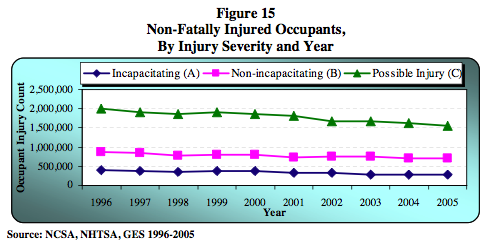
Issue #4: No other relevant statistics of any kind. I went scouring the NHTSA web site for some statistics on cell phone usage, driving, and accidents. I found lots of stats on cell phone usage while driving (PDF). I found lots of stats on accidents (PDF). I found NO stats that link the two together. Not one single piece of data which said anything like “with the ever-increasing number of cell phones being used while driving, here is the resulting increase in accidents”. In fact, I couldn’t even find a casual implication where anyone from NHTSA actually stated it just maybe might kinda sorta possibly cause accidents. Amazingly, if I found anything, its that both accident rates and injury/fatality rates are on the decline, year after year.
NHTSA injury stats

Here is the only “data point” I could find across the entire Web (aka “what I found by looking through a few pages of Google search results”), from the Public Policy Institute of California:

The findings indicate that mobile phone ownership is associated with higher traffic fatality rates in bad weather, on wet roads, and in rush-hour traffic. California’s new law should lead to some 300 fewer traffic fatalities a year.

I think that is awesome. Except, again, there’s no data to back it up, so it sounds more like “good spin” than anything else. But I could be wrong, and if on July 1, 2009, the state can in any way prove that they saved us lives, I’ll eat my (virtual) words. Of course, since accidents and fatalities are on the decline anyway, I am not exactly sure how they’ll do so, but I promise to keep an open mind.

Now for some hyperbole. It surely seems like every time I almost get sideswiped, or someone rolls through a stop sign while I’m pushing the stroller, the driver has a phone at his/her head. From all appearances, its definitely those idiots on their phones that are causing all the problems. And I, like everyone else, want fewer accidents and safer roads for all. But maybe it’s just the impression of idiocy? On the freeway yesterday I almost merged with a Ford Pickup that was in my blindspot, but I wasn’t on the phone at the time.

The bottom line, in my eyes, is bad drivers are bad drivers, and give a bad driver a distraction, and he/she will find a way to become a worse driver with the distraction. I hate the catch-all blame of technology for society’s woes. We should be requiring car manufacturers to enable voice-controlled stereos, temperature controls, and GPS systems, as all have been causally linked to accidents. The real question here is why isn’t the State (or Country) protecting its citizens by putting the power in the manufacturers’ hands? Hint: the answer is, similar to the copyright laws, its easier to push individual citizens around than it is to get big companies with big lobbyists to make change.

The NHTSA states “the task of driving requires full attention and focus. Cell phone use can distract drivers from this task, risking harm to themselves and others. Therefore, the safest course of action is to refrain from using a cell phone while driving.” This seems to apply to many products beyond a cell phone, but have been in cars for much longer. It’s a shame that this law takes effect tomorrow, as it will, in my best guess, cause more work for police, not help the growing nationwide traffic problems, and fundamentally not save us from the bad drivers who just don’t pay attention regardless of the phone, donut, coffee, Blackberry, iPod, rattle, stapler, or other attention-getter they are holding in their hands. The State of New York (remember, the ones with LOTS of data) has advice, which is labeled with “use common sense“. Shouldn’t that apply to the lawmakers as well?

Posted in Mobile Technology, That's Janky | 9 Comments |

Garmin wants $70 for a… map!?

Posted on June 16, 2008 by Jeremy Toeman

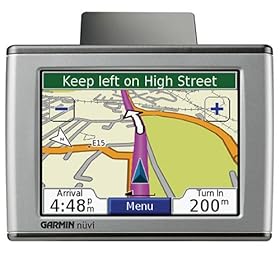
Let me open by saying I think my Nuvi 350 is one of my favorite devices.  While there are a few improvements I could point out, for the most part it works very intuitively and reliably.  With the exception of the one time I was trying to find a Dairy Queen (Blizzard? hells yes.) and I ended up outside of someone’s house while hearing “you have arrived.”  And the guy didn’t even have ice cream.  Fail.

Today I received the following email from Garmin:

Garmin is pleased to announce the new Map Update 2009 for North America. For the most up-to-date maps and navigation on your portable Garmin GPS unit, this is the software you want. This $69.99 update offers full coverage for the U.S, Canada and Puerto Rico – making it easy and convenient to update the detailed maps and latest points of interest into your compatible Garmin unit.

The update includes:

  • Over 8 million miles of road coverage
  • Updated, fully routable, detailed maps for the U.S., Canada and Puerto Rico
  • Nearly 6 million points of interest
  • Postal code support for Canada

Purchase the Map Update 2009 today!

Now I’m sure Garmin is paying someone (Navteq?) for their maps & data, and have costs to recoup.  I have no problem with paying for an update, if the price is right.  And maybe back 10 years ago $70 was a fair price, but today it isn’t.  The Internet has effectively trashed the value of data to consumers, and price points need to reflect that changed mentality.

As I write this, the Nuvi 350 is $203 on Amazon, meaning new updates are over 1/3 the price of the hardware.  Whereas going to Google Maps is free, always.  Granted, my Nuvi is more convenient than printing maps, and I am willing to pay something.  How about $9.99?  Or maybe $19.99?  Those seem like a “fair” price to pay for a map update.

There’s simply no way in the current market to accept $69.99 as a fair market value for a map update. Especially in context of a certain new phone that’s going to cause even more issues for a slowly failing GPS market.

Posted in Gadgets, Mobile Technology, That's Janky, Travel | 5 Comments |

Sprint Mogul Review

Posted on June 10, 2008 by Guest Contributor

The HTC Mogul is a smartphone available on the Sprint network, which runs Windows Mobile 6 Professional. It is equipped will a full QWERTY slide-out keyboard, and a QVGA (240×320) touchscreen. The Mogul I’m using for review has the newest ROM upgrade which unlocked the GPS chip, and the EV-DO Rev-A data connection.
To get the new ROM update for your Mogul go here.

Listed are the rest of the phone’s important specs (taken from phonescoop.com)

Weight 5.8 oz
Dimensions 4.33″ x 2.32″ x 0.73″
Check out this iPhone vs Mogul size comparison
at sizeasy.
Battery Talk – 5.4 hours max. (324 minutes)
Standby
– 340 hours max. (14.2 days)
Processor 400 MHz
Memory RAM – 64 MB
Storage – 162 MB
Connectivity Bluetooth – Supported Profiles: HFP, HSP, OPP, A2DP, AVRC, HID, PAN, SAP version 2.0
Wi-Fi
– 802.11 b,g
Memory Card Slot Type microSD (TransFlash)
Camera Resolution 2+ megapixel

Like all other WM devices this phone works best with the Microsoft Exchange server. It flawlessly integrates all your information over the air, without needing to connect to any computer, ever. It can receive emails the instant they are in your inbox, add dates and times of accepted calendar invites directly into your calendar app, and sync your contact and task listings. Users who are looking to get these tasks done quickly and effectively are the ones looking into the HTC Mogul. This device is very powerful but it isn’t for everyone, below are my opinions which should help you decide whether this smartphone is right for you.

Hardware–
The Mogul is a very tactile phone. It has 5 programmable hardware buttons, a 5-way directional pad, 2 hardware softkeys, a call and end button, a start button, 2 “OK” buttons, a navigational dial, a full QWERTY slide out keyboard, and a hardware WiFi on/off switch. The device feels like a rather good size for my hand. It couldn’t hurt if it was a little bit thinner, but it doesn’t feel overwhelmingly thick. The phone feels very sturdy, but it is a little on the heavy side. This might be a problem for someone with children that like to use their phone every once in a while. My other concern about the physical hardware is the super flimsily battery cover.

One of the best features of the hardware is its slide out keyboard. It has a spring loaded action, which causes it to snap open and closed, making a solid clicking sound. The keys themselves are spaced out very well and give good feedback when typing. There are also 2 indicator lights, located at the top, that illuminate when the caps or the function locks are activated. This is a cool feature that makes typing on this device, that much easier.

The one down side about having a slide out keyboard and no keypad on the face of the device is that it is extremely difficult to type with one hand. There is an onscreen keyboard that lets a user do so, but the keyboard that comes standard is so small you end up hitting the wrong letter half the time. There are 3rd party onscreen keyboards, but each of them has its own flaws and they don’t seamlessly integrate with every application. For those of you that text and drive, this phone isn’t for you. (disclaimer: don’t text and drive, it is very dangerous to take your eyes of the road for extended periods of time.)

OS-
Windows Mobile 6 Professional is overwhelmingly decent right out of the box. It is a multi-tasking OS, meaning more than one application can run at a time. Due to only 64MB of RAM, the OS tends to lag a little between clicks and app changes. When a user is done with an application, they need to be sure they hit the “X”, to close the app, or else it will stay open and drain memory resources. This is a change that was added with the newest ROM update. On some occasions the phone requires a reboot, in order to function at normal speeds again. These lag and speed issues are ones that a user must learn to live with, or else they will find themselves looking to get a different phone, fast.

User Interface-
The user interface for WM6 is out dated; it takes its design cues from Windows XP. While one can accomplish all of the same tasks on its default setting, WM6 doesn’t start to shine until you step into the realm of customizing it and making it your own. Here are some before and after shots of my home screen.

Default HTC Mogul Home Screen Custom HTC Mogul Home Screen
Mogul Default Home Screen Mogul Custom Home Screen

As you can see on the left I have the default home screen with some basic information that a user needs. On the right is my customized home screen with a nice big clock along with email, text message, and missed call buttons. Below that are 3 big tabs that give me access to, this home screen, a weather screen, and a quick launch screen with shortcuts to 9 most used programs. Since the Mogul has 5 programmable hardware buttons, with this home screen plug-in, once my phone is turned on and unlocked, I am no more than 2 click away from 20 different programs. Which makes navigating much faster than the default home screen.

This home screen plug-in was actually taken from the HTC Touch and adapted to work on other HTC WM6 smartphones. A web community called XDA-Developers, made this and other HTC apps conversions possible.

The home screen is only the beginning of the modification I have made to my WM6 Mogul UI. I installed threaded text messaging, an iPhone-like contacts app, a new skin for the phone screen, a new system font, a single click app that changes my phone from ring to vibrate, and an HTC on screen keyboard. The great thing about WM6 on an HTC smartphone, is that with the xda-developers community and other sites like it, there are endless possibilities of the looks and applications you can add to your smartphone.

Must have app-
The absolute best application that every owner needs to add to this phone is Google Maps. Since it has a GPS chip you can use the app to find your current location, which takes about 10-15 sec. Once it has that, you can search your area for whatever business or address you are looking for. If you like, you can then get directions from your current GPS location to the location you just searched for. With this app it’s truly amazing how fast you can find places and get directions from your current location.

Highlights-
-The full QWERTY slide out keyboard, gives users a rather quick and easy way to type on this device. The downfall is the lack of a quality onscreen keyboard for the times that a user would want to use one hand to type.

-Over the air syncing makes this phone a much needed tool for user working at a business with the Microsoft Exchange server.

-This phone begs to be customized, therefore if a user doesn’t have the time or skill to do so, their user experience won’t be at its optimal level.

-The ability to multi-task on this phone lets user accomplish multiple things at a time. The downfall is that its RAM is limited and causes the phone to lag when too many things are running.

-Google Maps with the updated ROM that unlocks the GPS chip, makes this phone a valuable tool for traveling business users.

Final thoughts-
Overall I think that the HTC Mogul is a great smartphone with tremendous power. This device is perfect for business users that do a decent amount of traveling. The Mogul is also a good fit for users that enjoy tweaking out their phones and spending time to customize them. Casual and beginner smartphone users, might find this phone a little too overwhelming.

Hopefully I have given you enough information for you to decide whether or not this smartphone could be the right smartphone for you. If you still need more information, I recommend, like I do with every smartphone, try it out before you commit to purchasing it. Since every service provider has a 30 day return policy, anyone can sign up for a new phone, return it within the 30 days, and only pay for the service used in that time period. This will help you know for sure you like the phone before you port your phone number and/or get locked into a 2 year agreement.

Posted in Gadgets, Mobile Technology, Product Reviews | Tags: HTC, Mogul, review, Sprint, Windows Mobile, WM6 | 5 Comments |

So what's a G1 iPhone worth now?

Posted on June 9, 2008 by Jeremy Toeman

As all humans across the planet are now aware, there’s a $199 3G iPhone (with GPS) available come June 11th.  John Biggs observes, that’s with a 2-year contract, but I don’t really feel that makes a difference since most typical consumers are re-upping contracts as they buy phones anyway.  $199 is an amazing price point, one sure to help get Apple to hit their previously-hard-to-reach volume numbers.  Let’s look at what you get for $199 now:

  • Arguably the best phone on the market, at a very competitive price to all “trendy” phones, making it affordable to non-professionals alike.
  • A GPS device.
  • A 3G mobile Internet + email device.
  • An 8GB MP3 and video player.
  • Access to a fairly big supply music, movies/TV shows, and now games and other applications.

All in all, not too shabby.  I’m still not running out to buy one (no Verizon, still want a keyboard, etc.), but I’m more tempted than ever.  It’s exactly the right price point to move large volumes of phones (here you can compare it to other top-priced AT&T phones.  Yes, that IS a RAZR in the mix, wow!).  It’s the same price as a Treo (shudder).  Incidentally, looking back a year I was about half-right on my G1 and G2 phone predictions.  Oh well, live and learn.

After some random, informal, and ridiculously unscientific polling, my hunch is a lot of first-generation iPhone users are going to wait until about 12:03am on the 11th to buy the 3G iPhone.  But what are they gonna do with the old ones?

Can’t really resell em (unless they’re unlocked) for any real value.  Again, I don’t view the 2-year contract as any kind of deterrent, and therefore it won’t help spur sales at near price points ($179, $149, even $99).  They’re still listed above $300 on eBay, but that will definitely change in the near future.  My hunch is the price settles in somewhere right around $80.  This makes an all-in early adopter program run a grand total of $718 ($599 + $199 – $80), not to mention the $100 iStore coupon.

Posted in Gadgets, Mobile Technology | 4 Comments |

Routers Need an Emergency Mode

Posted on June 8, 2008 by Jeremy Toeman

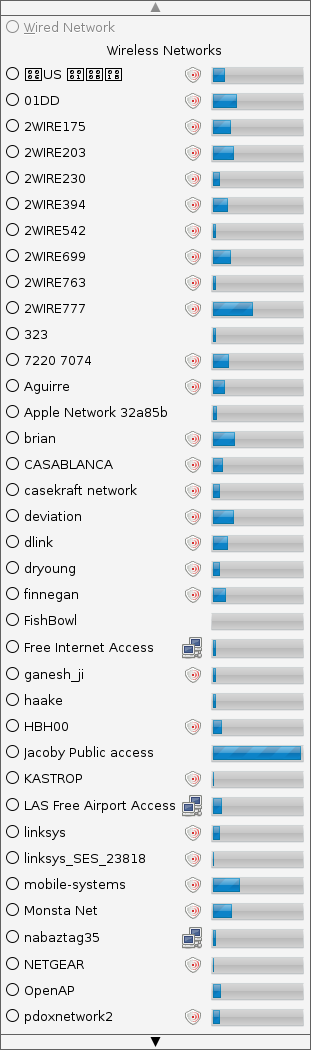
Where it used to be hard to find a WiFi network, these days it’s hard to find only one.  If you live in an apartment building, you may spot dozens of networks.  And thanks to malicious jerks around the world, most of them are closed, locked down, unavailable.  This is pretty strongly advisable, yet slightly disappointing from a community angle, and often-times very frustrating from a “gotta get online to send this email” perspective.
My first piece of wishful thinking is having router manufacturers enable an “emergency mode” triggered by natural disasters or other major emergencies.  I’ll say up front I have no idea who is responsible for triggering this switch, but let’s assume local governments could determine such a method (just don’t have it over to FEMA, they apparently rarely know when or where emergencies occur).  When routers receive the “emergency signal” they provide open access to the Internet.

While I may be oversimplifying the technology impact and there’d obviously be some security implications, the purpose here is to give people an easy way to share and receive vital information.  The phone lines and cell signals may be overwhelmed with traffic, but assuming either phone or cable services are available, people with Internet-enabled mobile devices and laptops would all be able to rapidly reach out.  We could share updates, find safe havens, etc, all with simple Internet connectivity.

I don’t exactly know what it would take to make this happen.  My hunch is it simply won’t.  But when I see 23 hotspots in my surrounding region and know full well that a stranger couldn’t use a single one of them in time of need, it makes me ponder how we can better use technology to improve our community.

Posted in Mobile Technology | 4 Comments |

Avi Greengart reviews 5 iPhone cases

Posted on June 6, 2008 by Jeremy Toeman

I get a lot of accessories and other doodads that don’t merit formal reports at Current Analysis, but are interesting nonetheless. Here’s a quick rundown of five iPhone cases:

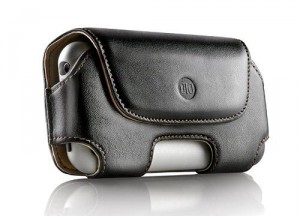
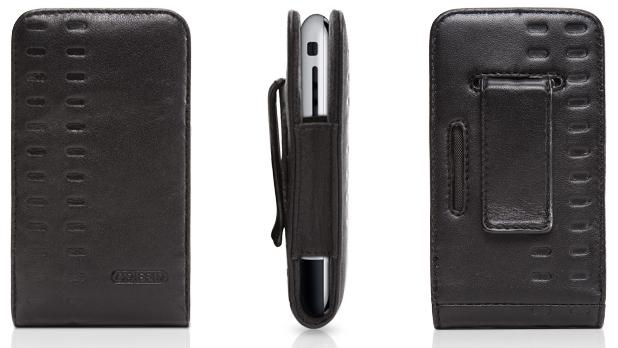
DLO HipCase ($34.99) – this was one of the first iPhone cases on the market, and easily one of the most attractive – provided you don’t mind the wide “eyeglass case” style. The leather case protects the phone reasonably well, though the corners are left exposed. I managed to dent – but not break – my first iPhone sample when it dropped to the floor in this case and hit precisely at the corner near the headphone jack. The big downside to this case is that the belt clip is permanently attached, so it is awkward to slip into a pocket instead of perching it on your hip.

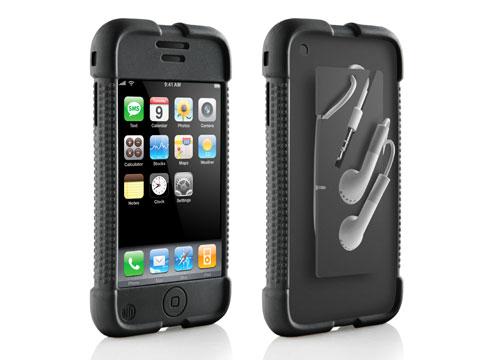
DLO Jam Jacket ($24.99) – this one looks like a simple silicone overlay, and it is, though there’s a twist around back. Instead of a belt clip, there’s a hard silicone protrusion which is used to wrap your headphone cord around, and even indentations for inserting Apple’s stock earbuds. There are a bunch of problems with this case: it doesn’t protect the screen in any way. It doesn’t have a belt clip, so if you want to use it that way, you can’t. Worse, if you want to stick the iPhone in your pocket, that’s difficult, too, because the cord winding thing sticks out. Finally, if you don’t use Apple’s stock ear buds – I don’t – then they won’t fit in the spots cut out for them on the rear protrusion, either. If it fits your needs perfectly, great. But I can’t generally recommend this one.

Griffin Elan Holster ($29.99) – Griffin has a bunch of different cases for the iPhone, and this one is one of the simplest. It is a leather sleeve open on one of the short ends and exposed along the sides for access to the volume buttons and ringtone on/off switch. Fit is pretty snug, which is a good thing if you want to take advantage of the case’s flexibility: it can be used with a removable belt clip in either vertical or horizontal orientation (if it wasn’t a snug fit, the iPhone would fall out when you have it in horizontal mode). So, vertical belt case? Check. Horizontal belt case? Check. Pocket case without a clip? Check. Screen protection? Check. It is attractive, but not as attractive as the DLO HipCase, so if flexibility matters more to you than fashion, Griffin’s Elan Holster is an easy recommendation.

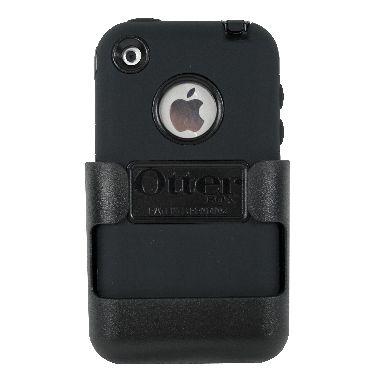
OtterBox iPhone Defender ($49.99) – the Defender series of cases from OtterBox are semi-rugged, designed to survive jostling and moisture, but not sledgehammers and swimming pools. The case is built in layers: first, there’s a hard plastic shell (which splits in half to insert/retrieve the iPhone itself) which has a “patented thin membrane” that covers the iPhone’s screen. Surprisingly, I found that the membrane does not interfere with usage of the phone at all. On top of the hard plastic shell, you then put on a silicone jacket, which includes plugs for all the ports so that moisture can’t enter them when they are closed, but headphone jacks and USB cords can be used when they are open. Then, the whole contraption fits into a belt clip made of even thicker hard plastic with a rotating hinge so that the clip can be worn vertically or horizontally. I did not deliberately drop test the iPhone in the OtterBox case because I’m fairly certain Apple wants at least one of its loaners returned from me unharmed, but I used this case for months and came away extremely impressed with its well thought out design.

There are a few drawbacks, however. First, the case does add some bulk to the iPhone, particularly when the belt clip is used; that is to be expected. All the iPhone’s controls are accessible, save one: the ringer on/off switch cannot be used when the iPhone is in the case; this is a minor, but significant loss. The biggest problem is that getting the iPhone in and out of the case is a nightmare, and when in the case, the iPhone doesn’t fit in its white stand or in any of three or four iPod speaker docks I tried. It can be synced using the USB cable itself without the stand, so if you don’t ever dock your iPhone even that won’t be an issue.

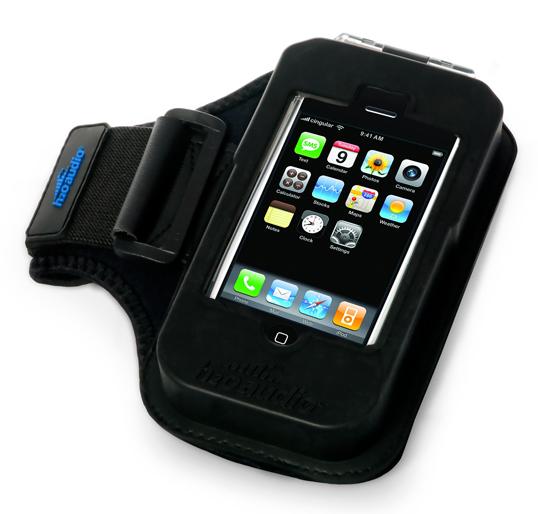
H2O audio iFR Sport Combo ($29.99) – H2O Audio is known for cases and headphones that are fully waterproof, but the iFR case/armband combination is merely water resistant, much like the OtterBox case. Unfortunately, it is not nearly as well designed as the competition. It is far bigger and bulkier, and looks more like the fully ruggedized waterproof cases H2O Audio sells for the iPod (those cases are advertised as being designed for taking an iPod surfing which justifies their size). On the iFR, there is a clear hard plastic front piece that protects the screen which must be flipped out of the way to gain access to the iPhone’s controls underneath, which then completely exposes the iPhone to your fingers and to moisture. In practice, the flip-away cover makes it very difficult to answer the phone quickly, and you cannot surf the Internet outside during a light drizzle, never mind go into real surf. The armband is almost comically large. On the other hand, inserting and extracting the iPhone is a relatively simple and quick affair compared to the OtterBox. I have been quite impressed with some of H2O Audio’s ingenious waterproof cases, but I cannot recommend this one.

About Avi: At Current Analysis I focus on testing mobile devices and advising clients how competitive they are in the market. None of the products I’m recommending here come from clients, and I do not own stock in any of the companies. I do not pay for review units, and while most devices I test get sent back (whether the companies want them back or not – I need to get them out of my house), I have kept some of the items listed below for… lets call it a long term loan.

Posted in Mobile Technology, Product Reviews | 1 Comment |

Mininotebook Lemmingness

Posted on May 29, 2008 by Jeremy Toeman

Lots of noise in the air today after Dell introduced (well, showed) a mininotebook at D6. I think the category is… interesting(ish), more a novelty than anything else. I’m sure there are some people who look at these laptops as their ultimate solution for computing, and others who scoff. Either way, the space is getting crowded, and unfortunately, I feel it’s crowding up in a boring way. Here’s a short video with my thoughts:

Posted in General, Mobile Technology | 3 Comments |
« Previous Page
Next Page »

About

Jeremy Toeman is a seasoned Product leader with over 20 years experience in the convergence of digital media, mobile entertainment, social entertainment, smart TV and consumer technology. Prior ventures and projects include CNET, Viggle/Dijit/Nextguide, Sling Media, VUDU, Clicker, DivX, Rovi, Mediabolic, Boxee, and many other consumer technology companies. This blog represents his personal opinion and outlook on things.

Recent Posts

  • Back on the wagon/horse?
  • 11 Tips for Startups Pitching Big Companies
  • CES 2016: A New Role
  • Everything I Learned (So Far) Working For a Huge Company
  • And I’m Back…

Archives

Pages

  • About

Archives

  • January 2019
  • April 2016
  • January 2016
  • December 2015
  • June 2015
  • May 2015
  • April 2015
  • March 2015
  • February 2015
  • January 2015
  • December 2014
  • November 2014
  • October 2014
  • September 2014
  • August 2014
  • June 2014
  • May 2014
  • April 2014
  • March 2014
  • January 2014
  • December 2013
  • September 2013
  • August 2013
  • July 2013
  • May 2013
  • February 2013
  • January 2013
  • December 2012
  • October 2012
  • September 2012
  • August 2012
  • May 2012
  • April 2012
  • March 2012
  • February 2012
  • January 2012
  • December 2011
  • November 2011
  • October 2011
  • September 2011
  • August 2011
  • June 2011
  • March 2011
  • February 2011
  • January 2011
  • December 2010
  • November 2010
  • October 2010
  • September 2010
  • August 2010
  • July 2010
  • June 2010
  • May 2010
  • April 2010
  • March 2010
  • February 2010
  • January 2010
  • December 2009
  • October 2009
  • September 2009
  • August 2009
  • July 2009
  • June 2009
  • May 2009
  • April 2009
  • March 2009
  • February 2009
  • January 2009
  • December 2008
  • November 2008
  • October 2008
  • September 2008
  • August 2008
  • July 2008
  • June 2008
  • May 2008
  • April 2008
  • March 2008
  • February 2008
  • January 2008
  • December 2007
  • November 2007
  • October 2007
  • September 2007
  • August 2007
  • July 2007
  • June 2007
  • May 2007
  • April 2007
  • March 2007
  • February 2007
  • January 2007
  • December 2006
  • November 2006
  • October 2006
  • September 2006
  • August 2006
  • July 2006
  • June 2006
  • May 2006
  • April 2006
  • March 2006
  • February 2006
  • January 2006
  • December 2005
  • November 2005
  • October 2005
  • September 2005
  • August 2005
  • July 2005
  • June 2005
  • May 2005
  • April 2005
  • March 2005
  • February 2005
  • January 2005
  • December 2004
  • November 2004
  • October 2004
  • September 2004

Categories

  • Convergence (81)
  • Gadgets (144)
  • Gaming (19)
  • General (999)
  • Guides (35)
  • LD Approved (72)
  • Marketing (23)
  • Mobile Technology (111)
  • Networking (22)
  • No/Low-tech (64)
  • Product Announcements (85)
  • Product Reviews (109)
  • That's Janky (93)
  • Travel (29)
  • Video/Music/Media (115)
  • Web/Internet (103)

WordPress

  • Log in
  • WordPress

CyberChimps WordPress Themes

© LIVEdigitally