Quickie post here. I’ve been a wee bit swamped recently to do much blogging (although I am reviewing new products from Gefen, the iRiver Clix, and MusicGremlin), but I did manage to incorporate a Mobile version of LIVEdigitally! That’s right, check it out with any smartphone and you should be automatically redirected here (click on it for a preview).
The fun part was taking Alex King’s awesome Mobile plugin for WordPress then tweaking it myself. Yup, I dusted off the ol’ PHP typewriter and did some work. I’m still playing, but when I’m done I’ll make the source available for anyone who wants to try it out. Edits so far:
- Category-based browsing (the original only supports by archival date)
- Related stories (thanks to this plugin)
I’d like to hear any feedback y’all have to give about how it works. I primarily use a Treo 700w and PPC 6700 to view the site, so haven’t seen it in a crackberry yet… Other features I’d like to add:
- Search (I hear search is big…)
- Pages
- Links to my Flickr photos
- Blogroll
Am I missing anything? Write your suggestions as comments.


 Get this – Ismo Karttunen, a Finnish inventor, came up with the idea to distract you with music videos from Christina Aguilera and Ashley Simpson (or anybody) while you’re getting your root canal. You just slip on the high-tech goggles and hopefully your mind wonders elsewhere.
 I think I read about 1080 articles (or was it 720) on how impactful HDTV World Cup broadcasting was. Missed em? Here are a few good ones to get you started:

 to your bag/PDA/dog/toddler and put this
  in your pocket. The
 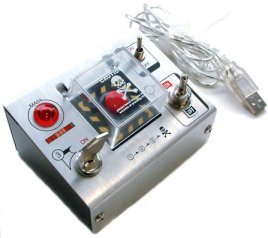 For those moments when your computer is lagging so badly you’d like to take a hammer to it, or when the realization that it just ate your term paper creates a deadly longing to chuck the whole damnable thing out the window, there’s a way to
  My first example is my new
  But when I first started, it could never get the Gefen to switch right. So I clicked Help, and followed the on-screen ‘yes/no’ options until it worked. Eventually I went back to the Harmony setup application on my PC and found I could ‘slow down’ the commands to make it more reliable (which did in fact work like a charm).
  I think it would be very easy for Logitech to add a bit of intelligence to the Harmony. Maybe after doing the same thing 3 times the remote could say “please dock to your PC for an update”, at which it uploads the info to the PC, and the PC application can have enough smarts to say back to me: “there is a problem with your activity, let’s try to fix it.” It doesn’t have to be smart enough to actually fix it independently (although that’d be nice too), but it should be smart enough to track little things like this. Extra points to tivoboy who
 .JPG "Nuvi - Favorites")
.JPG "Nuvi - enter city")
 Now I know learning isn’t easy. I know AI is ridiculously hard (although


