• About

LIVEdigitally

Category Archives: Video/Music/Media

Slingbox for Mac now available in beta!

Posted on October 31, 2006 by Jeremy Toeman

I’ll start by being a little upfront about something here – I’m not a “Mac guy.”  While I don’t really identify as the “PC guy” from the commercials either (although the spoofs are great), I don’t own a Mac, and probably won’t get one any time soon.  I have no problem with the Mac folks out there, and appreciate all the ingenuity Apple brings to their products.  But I’m not a Mac guy (or an iPod guy either for that matter, but for a totally unrelated reason).

Funny enough, back when I worked at Sling Media, I was a huge proponent of enabling SlingPlayer Mac support for the Slingbox.  I believe the Mac community, as a whole, appreciates the convergence of computing and media, and tend towards early adoption of most new media technology.  I think the iTV product is more likely to succeed in the “get your home media collection from your computer to your TV” vision that so many others have failed in delivering in the past.  With any luck, Apple will help open the “digital home” marketplace for many others to come participate in, as none have shown success to date.

Back to the matter at hand: Sling Media made SlingPlayer for OSX available in beta today (here’s the download).  There’s already a flood of conversation on the SlingCommunity, and even a great note from Blake himself talking about the issue.  I’m thrilled to see the build come out within the adjusted schedule (here’s about 900 or so posts on the topic if you want some backstory on the issue), and I know the team back at Sling HQ must be pretty happy with the launch – way to go y’all.

As I’m not a Mac guy myself, I don’t have a review to offer up, but it’s already being mentioned on TUAW, RealTechNews, and my friend Dave Zatz managed to get a post up just before sneaking off to bed (poor East coaster).  To get an unbiased account of the software, check out the very in-depth review one of the beta testers wrote here. 

Happy downloading!

Posted in General, Product Announcements, Video/Music/Media | Leave a comment |

Arrested Development Chicken Dance. COME ON!

Posted on October 29, 2006 by Jeremy Toeman

While hanging out with Steven Jones from Capable Networks tonight, we did a little A.D. reminiscing (Ron was there too, but he doesn’t watch the show, so he gets no credit). It left me a little sad and longing, and even after watching a couple of episode from my DVR with the ol’ Slingbox I still wasn’t quite ready to move on. I needed a little of GOB’s Chicken Dance, and it only took a single search on YouTube to find a perfect compilation:

Posted in General, Video/Music/Media | 1 Comment |

Do you Need HDTV? Absofreakinglutely!

Posted on October 24, 2006 by Jeremy Toeman

I was perusing Dave Zatz’ site this morning and noticed his new contributor Mari (congrats!) mused on HDTV with the post “Does Mari Need HD?”

I’ve had a DVR for five years now, but I still haven’t picked up an HDTV. Honestly, I have trouble believing I need it and trouble believing it will make that much of a difference in my TV-watching career. Which is why Dave Winer’s recent commentary got my attention: He didn’t offer any great new analysis, but he proclaimed HD is “a life-changer.”

JT HDTV (4)I couldn’t agree more.  But I somewhat understand Mari here, because I feel there’s a big “my living room effect” that needs to occur before you can really understand how much you need it.  Especially as all the HD tech can be confusing – plasma or DLP or LCD?  HDMI or Component video?  Cable vs OTA vs Satellite – blech, that’s a lot to learn about and even then you have to go throw down about $1500 to really get started.  I did write a post to help explain HDTV technology, but I acknowledge the buying process is still much more painful than it should be.I’ve watched HDTV demos at shows like CES and CEDIA for the past 7 or 8 years.  Cool.  Beautiful looking.  I’ve been to the headquarters of companies such as Sony and Pioneer in Japan, saw the state of the art displays and sound demonstrations.  Awe-inspiring stuff.  I’ve walked the aisles of Best Buy seeing all the maxed-out brightness on display.  Very very nice.

And then I had a moment where I was able to get a 32″ LCD extremely cheaply, and I took the plunge.  A week later and I’m watching my Syntax Olevia set connected to my Motorola DCT 6412 dual-tuner HDTV DVR.  And I’m transported into a new state of TV. During hockey, I can see all the game.  The nature shows on Discover HD are unbelievable.  Regular dramas look like movies.  Here are some of my quick pictures of my setup, and here are a few from my friend Dave.

To be clear: ALL HDTV looks better than ALL REGULAR DVDs (and HD-DVD/BluRay look about equivalent).  So when ABC aired Pirates of the Caribbean a few weeks ago, it looked better than the picture of the DVD, even on my upscaling Samsung DVD player.

The entire quality of the experience is so much better that standard definition TV is becoming harder and harder to watch.  I actually started dropping shows from my DVR’s subscription list just because they weren’t broadcast in HD!  I have about 20 channels today, of which 3 were added in the past few months, and I’ve been told more are coming soon.  Also, HD is going to be one of those driving factors as to why TV still has a bit of a pulse, as opposed to those who think it’s dead.

JT HDTV (2)Watching HDTV is like putting on glasses when you need them.  Would you take your glasses off while driving down the street?  Doubtful, but you might not have realized you need to wear them.Ultimately, I think the biggest way people get won over to HD is not by reading posts like this, but by being in someone’s house and watching it.  Not just that it’s on the in background, but watched.  So Mari (and other nonbelievers), pick your favorite “mainstream” show (CSI, Grey’s, Heroes, etc) and for the next two weeks, try to find a friend who has HDTV and watch it with them. 

That just might help you find the need for the glasses.

Posted in General, Video/Music/Media | 1 Comment |

Thoughts on Fall TV 2006 – when did TV get this good?

Posted on October 22, 2006 by Jeremy Toeman

For the past three years, my wife and I approach each Fall season with one thought in mind: let’s try not to pick up any new shows.  We have a DVR (Comcast HD – Motorola DCT6412), and have a dozen or so subscriptions, and we just don’t want to spend more time in front of the set than we already do.  Well, the Fall lineup appeared, and with it came a decent set of new shows.

Let’s start with last years’ subscriptions (not necessarily in priority order):

  • Saturday Night Live – sure, it’s 90 minutes, but with a DVR, it’s really about 25 minutes total
  • Grey’s Anatomy – not my pick, but the wife and all the friends love it
  • House – I can’t get enough of the “mysterious ailment drives patient into hospital, doctors wittily convince House to take the case, initial obvious treatment appears to work but almost kills the patient, side antics with some moron with a sexually-related issue that’s instantly solved in a derisive manner, main patient approaches death, inter-doctor conflict ensues, then 6 minutes before the end of the episode House stumbles upon the solution, fade out to cool classic rock music.”  Yeah, it’s formulaic, but I like it.
  • Boston Legal – Shatner and Spader. Nuff said
  • Criminal Minds – This is one of the shows I like to have on the DVR to watch via Slingbox when travelling.
  • The Apprentice – Its our guilty pleasure.  Each year since the first we keep meaning to remove it from the list, but somehow it never disappears.  Plus I auditioned for it once – yeah, it’s true, I admit it.
  • Scrubs – Great show with very underrated writing.
  • Globe Trekker – Nice to see the world we live in, even if it’s not in HD (Equator on Discovery Channel may replace it soon)
  • World Poker Tour – I still like watching TV poker, but this is the only one whose reporting is tolerable (can someone PLEASE replace the WSOP guys, they’re just horrid)
  • My Name Is Earl – Best new show from last year, Jason Lee has found his calling.  Unfortunately it’s a scummy guy-turned ethical, but he’s darn good at it.
  • The Office – Loved the BBC version.  Hated Season One.  Now it’s the best comedy on TV.
  • 30 Days – Of the whole list, this is the one I’d call a must-watch.  Morgan Spurlock’s “reality” show pitting individuals against very alienating situations is very eye-opening.
  • Arrested Development – So good I still watch it. Seen every episode. Willing to see them all again. 
  • Simpsons – It’s really here for nostalgic purposes, as it’s been lousy for a few years running.  I figure the whole season has about enough material for two entire episodes these days.
  • Family Guy – Not as good as the first two years, but has more individual LOL moments than anything else I watch.  Although I didn’t appreciate the so-called “Season Finale” last year, which was really just the Stewie movie divided into three parts.

See, it’s a long list!  Granted, a few of the shows (WPT, Simpsons, SNL) I/we don’t care if they get wiped when the DVR runs out of space, but there’s still just way too much television there. And, yes, there are new ones this year:

  • Psych – I really enjoyed Monk for a year or two before I got tired of the same routine (although Tony Shalhoub is just great). I find Psych is kind of a “Monk 2.0” with a different type of quirkiness.  Fun show that doesn’t take itself too seriously, and has some clever moments.  Especially the musical numbers during the closing credits.
  • Studio 60 – It’s good, but not as great as we all want it to be.  The pilot was excellent, but it’s been a few notches below ever since.  Amanda Peet is completely unbelievable in her role, and we need to see a lot more of Timothy Busfield and a lot less Steven Weber.  But I’ll keep a-watching for now.
  • Standoff – The interaction between the couple is a wee bit, shall we say, nauseating, but everything else about the show is great.  I doubt it’ll make it, but I hope it stays alive.
  • Heroes – The best show on television today.  It’s like X-men lite.  Or a more serious Greatest American Hero.  Or Lost without an ever-expanding mystery (nope, I don’t watch Lost.  Why?  Well, I got burned by Twin Peaks, of which I was a huge fan back in the day.  When I have positive confirmation that the entire Lost storyline will make it to air, then I’ll go back and catch up with the DVDs.  Until then, I wait for the mist to clear up a bit).  Actually, it’s not like any of those – it is a truly unclassifiable show. I’d watch it for two hours a week if they’d make it that long. Other than a tiny bit of overacting by a few of the actors, it’s great. If you don’t watch Heroes yet, you are missing out.  It is the best show on television today.

That’s my list or now.  I watched two episodes of 30 Rock and I can’t figure out how such a good premise and cast can be so lame.  Twenty Good Years didn’t even have Twenty Good Minutes, and I felt like Tambor and Lithgow must’ve cringed every time they heard the embarrassing laugh track.  Didn’t want to bother with Brothers & Sisters, or Six Degrees, or The Nine – I hear they are okay, but I’m just saturated in each category they target.

UPDATED: for an excellent counterpoint on the health/quality of TV today, check out Steve Gillmor’s “TV is Dead” post.

Posted in General, Guides, Video/Music/Media | 2 Comments |

GoogleTube – it's official

Posted on October 9, 2006 by Jeremy Toeman

The rumors are all over the place (no fewer than twenty-five entries on techmeme today), but the AP reported a few minutes ago that YouTube was acquired for $1.65 billion.

The price makes YouTube, a still-unprofitable startup, by far the most expensive purchase made by Google during its eight-year history.

Holy cow, color me stunned.  I am blown away by this.  I had just finished reading Mark Cuban’s weekend post on the topic, and really didn’t think it was going to happen.  Congrats to Hurley and his team – job well done.

Can the GreedTube guys do it too, ya think?

Posted in General, Video/Music/Media, Web/Internet | 2 Comments |

Right under my nose

Posted on October 4, 2006 by Jeremy Toeman

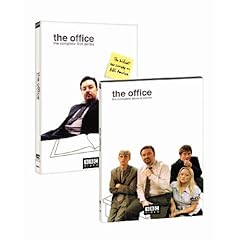
I was (and remain) a huge fan of the original BBC show The Office.  Huge.  Watched em all multiple times (and while I may rewatch movies often, I rarely rewatch TV shows), never failed to enjoy. 

When the NBC version started, I really had to force myself to stick with it, as the first few episodes seemed to be “weak” versions of the UK original.  But then somewhere mid-season, all of a sudden the show changed.  As if the actors and writers woke up one morning and decided to make their own show.  I became a loyal fan, I even watched some of the Webisodes this summer (also great, but almost frustrating due to the shortness).

Anyhow, last season ended with a cliffhanger (for those catching up via DVD I won’t discuss plotlines or anything), and I was quite excited for the season premiere two weeks ago.  While vacationing in Montreal I fired up my Slingbox, connected to my Comcast DVR, and there it was, right after My Name Is Earl, an episode of Globe Trekker.  Huh? 

Turns out, for whatever reason, the DVR missed it.  Maybe it was marked as a repeat, I dunno.  Not there.  Nothing.  Crap-all.  So I panic, accuse the wife of deleting it, you know, all the usual things. 

Next, I called all my friends, none of whom record it.  While their whimsical agreement that the show’s pretty good was nice to hear, it most certainly didn’t put the episode in front of my eyes!

A ha!  I remember a coworker also watches it, call to check.  Yup, he has a Season Pass(TM).  Awesome.  Guess what?  His DVR didn’t get it either!  I felt like Charlie Brown playing football with Lucy!
Back at work, I mentioned my dilemma to my officemate who reminds me it’s on iTunes.  Yes!  She downloads it with the intent to burn it to a DVD so I can watch it on my flight today.  Of course the download doesn’t end up on her office PC, but on her home PC, so it takes another day before she can bring it in.  And there we have it, the “book on tape” equivalent of the show.  Her suggestion that I act it out in my head while I listen didn’t quite help, but it did make me chuckle.  Or growl, I can’t remember.

Another friend of mine offered to find it online, using one of those Internet tubes or something.  A week goes by, no luck.

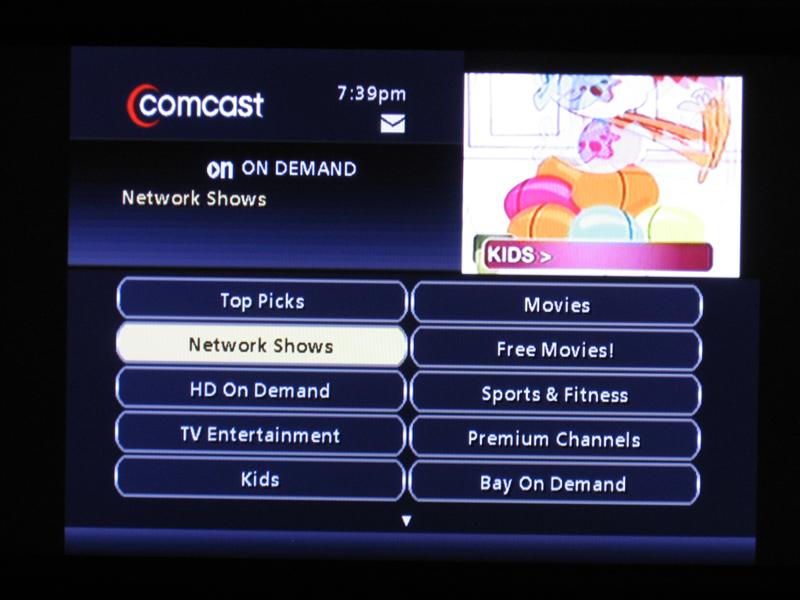
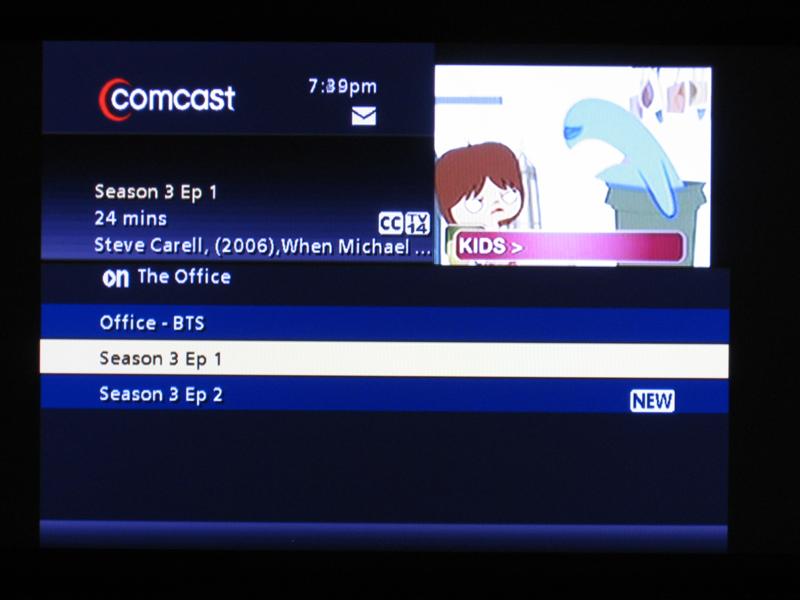
Network Shows listI’m about ready to give in, and then when my wife turned on the Comcast OnDemand channel today, I noticed “network shows”.  My heartbeat raced.  I selected it, then saw the channel lineup.  Oh my, there’s NBC!  Glory glory hallelujah.  Two remote buttons later, and there it is.  The Office, Season 3, Episode 1. 

$0.99? no problem (although if I’m paying for a show that was already aired for free I don’t really like seeing the ad at the beginning – either make it paid-for or free, not both, but then again, right now I’m a beggar, not a chooser).

The Office episode listIt was there the whole time, right under my nose.

Posted in General, Video/Music/Media | Leave a comment |

TiVo Series3: too little too late?

Posted on August 23, 2006 by Jeremy Toeman

Quick personal DVR history (here’s a good one for generic PVR history)…

  • 1999: Bought my first 14-hour TiVo in 1999.  Rough cost $400ish if memory serves.
  • 2000: Sold it, upgraded to a 30-hour unit.  About the same price.
  • 2002: Switched services to DirecTV, got 2 30-hour combo units.  With promos, ended up spending either $50 or $100 each. 
  • 1999 – 2005: Sold literally dozens of TiVos to friends, coworkers, relatives, etc.
  • 2005: Signed up for HDTV services through Comcast, got dual-tuner HD DVR.  No upfront costs, added $5/month to cable bill. 

While it’s very true the Comcast DVR experience (as delivered via my Motorola DCT 6412 III) is nowhere near as satisfying as the TiVo experience was, it’s now been almost a year and I really don’t look back anymore.  The first few weeks were painful, but, like all things, the pain turns to a dull ache, and then something you barely notice.  I miss the sound effects still, and completely acknowledge that the TiVo GUI is substantially better, but I don’t think it matters.

So when the news leaked yesterday that TiVo Series3 units (S3) are in testing/production, I just wasn’t all that wowed (I might be one of the only ones).  First, Dave Zatz asks the exact right question “how much will it cost?” 

See, that’s really all that matters.  Sure, it’s great that S3 supports CableCard and HD and all that (read Sean Alexander’s post on the matter for good CableCard insight).  But right now, the feature set only barely matters.  PVR Wire did a survey of their own readers (a.k.a. PVR Enthusiasts – the ones who will set the tone for the rest of the market) and there was very little interest in even upgrading to a dual-tuner TiVo.  Furthermore, according to TiVo’s own (public) sales figures, their net sales of new units in the first quarter was about 51,000 units.  For reference, in the third quarter of 2005 was almost 400,000 units.

TiVo, while a great brand and a great product, is fighting a massively uphill battle.  I pay a net of $60 per year for my (again) dual-tuner HD DVR.  I paid nothing up-front, and in fact some guy showed up at my house to do the installation for free, and while I had to sit around for a few hours, it was still free. 

While there’s no official number yet, Zatz is predicting $800 per unit.  Personally, I’d guess higher, probably $999 as a starting point.  Furthermore, if you need installation help, you are probably going to have to pay the Geek Squad somewhere between $100 and $300 for the install. 

The worst part is the past 2-3 years showed a bit of a dropoff on the TiVoMania effect.  Frustrated customers began doing the same move I did (although again, I was not frustrated by the company in any way) and switching to the freebies.  I applaud TiVo for making great products.  I sincerely hope the rumored Comcast-TiVo DVR is available in my area one of these days, as I’d probably make the switch.  As long as it’s free, that is.

Posted in General, Video/Music/Media | 1 Comment |

Gotta Get a Gefen (HDMI switch)

Posted on August 2, 2006 by Jeremy Toeman

My gearFunny how easy it can be to accidentally create need in our lives.  About a year ago this time I had a simple big-screen TV (used to do the projector thing, but the wife didn’t much care for it), a DVD player, surround sound, and an Xbox.  Then around Thanksgiving I see this great sale on a 32″ LCD set from Syntax Olevia, and I buy one.  A week or so later and I get a Comcast HD DVR, hook it up with component video cables, and am happy in HD-land. 

But then I discover HDMI and learn a few more things about HDTV.  And I get a Moviebeam and a Samsung upconverting DVD player. And everything became a problem, as I literally had to leave HDMI cables dangling behind my mess of a ‘rack’ and picked up a DVI-HDMI adapter from the ‘Shack.  Everything looked good on-screen, but was a major pain to manage.

Gefen 4x1 HDMI switchUntil I discovered Gefen.  Gefen sells a variety of products all designed to help clean up the variety of messes caused by, funny enough, upgrading to HDTV.  Simply put, most LCD and plasma displays only have one or two HDMI/DVI inputs.  I have 3 HDMI sources.  Compounding the matter my Syntax has a DVI input.  Boys and girls, we are in luck, because they make a video switch with four (yes 4) HDMI inputs and a DVI output.  They call it, simply enough, their 4×1 HDMI switch.

The unit comes in very simple packaging (somewhat like Sonos – I guess the more expensive the equipment, the less refinement that goes into the box), and includes a few cables which might come in handy depending on your particular configuration.  Also in the packaging is a simple setup/installation guide (plug A into socket A, etc) and a 4-button remote control.

Gefen 4x1 HDMI switch packagingGefen 4x1 HDMI switch box contentsBaby blue cablesGefen 4x1 HDMI switch and remote

Gefen 4x1 HDMI switch in handThe Gefen 4×1 switch is fairly small, about the size of a tissue box, and is finished in a metallic silver and light blue combination.  I personally think it has a bit of a ‘refined elegance’ to its appearance.  The back of the unit has power and the four HDMI inputs, while the front has a couple of LEDs, the DVI output, and a discrete remote control input.

Gefen 4x1 HDMI switch front viewGefen 4x1 HDMI switch rear view

Gefen 4x1 HDMI switch in action - top viewHooking up the Gefen was beyond simple, nobody (and I mean nobody) should have any problems with it.  I have a grand total of two complaints about the product, and here’s the first one:  the DVI output is on the front of the unit, which made placing the device a lot more complex than needed.  The problem for me is I need the ability to control the Gefen via infrared (using my handy-dandy Harmony 880 remote), so it needs to be ‘in view’ in my rack of devices (which is really just a shelf, but I can dream).  This creates a very awkward setup where the switch is underneath my LCD, and the DVI cable effectively snakes back around behind it, then up to the LCD.  In the grand scheme of things, its only a nuisance, and the company assures me the next version of the product has all the ports on the back.

Gefen 4x1 HDMI switch in action - front viewThe two LEDs on the unit show power (the red light – on or off), and input (the blue light – one through four).  The remote control has 4 buttons, which are labelled one through four, and switch inputs accordingly.  I guess that’s probably pretty obvious, but I like the simplicity so much I wanted to make sure that came through!  Complaint number two is the LEDs – I’d like an option to turn them off, or just lower the brightness significantly.  Definitely being nitpicky, but otherwise this would just be an overly glowing review, and we can’t have that, can we?

On to the technical side for a moment.  The Gefen switch properly passes through an HDCP signal, which is very important for copyrighted content.  Moviebeam, for example, only outputs HD content if it detects an HDCP-enabled output, and my Comcast HD DVR is also aware of HDCP (although I don’t believe it makes a difference at present).  Actually, I’ve discovered (and dutifully reported) a slight flaw with the Moviebeam device as a result of moving to HDMI.  It turns out if the Moviebeam unit is powered up without detecting HDCP it boots into standard-definition mode, and it also turns out the unit reboots itself every now and then with software updates.  What this adds up to is a problem whereby I have to physically remove the power from the back of Moviebeam, and then plug it back in and let it reboot if I want it back into HD mode.  Hopefully the Moviebeam guys will take my suggestion of adding a ‘redetect HD’ option somewhere in the advanced options menus.  Sorry for the long digression, back to Gefen!

Another feature for the technically sophisticated folks is the Gefen switch has an RJ-45 connector to allow for discrete IR control.  If those words don’t mean anything to you, well, you can probably scroll down a little bit.  For consumers who have built a home-control system, you can easily integrate the switch into your setup, and allow other devices and control systems to ‘talk’ to the Gefen unit.  As I stated above, I use a Harmony 880, which does include Gefen products in their amazing database, so didn’t try out this feature of the switch.

In summary, I really like the Gefen 4×1 HDMI switch.  If you have more than one digital HDTV source, you might need a switch.  If you currently use component cables because you don’t have another solution, you might need a switch.  If you have every episode of Hee-Haw on tape, you might be a redneck.

My cable messAs I said earlier, my needs were multiple HDMI inputs, single DVI output. You may need a different combination for your particular setup, and lucky for you, Gefen offers a few different switches to choose from!  The one I tried here retails for about $300.  Chalk down the next version of the switch (with all inputs/outputs on the back) as “LD Approved” and this one as “really really good, but needs one fix to be perfect”.

Now if only I can clean up my cable mess, I’d be one happy guy!

Posted in General, Product Reviews, Video/Music/Media | 8 Comments |

Dentistry + MTV?

Posted on July 26, 2006 by Guest Contributor

Dental GogglesGet this – Ismo Karttunen, a Finnish inventor, came up with the idea to distract you with music videos from Christina Aguilera and Ashley Simpson (or anybody) while you’re getting your root canal. You just slip on the high-tech goggles and hopefully your mind wonders elsewhere.

From New Scientist:

Dentists testing the glasses in Finland asked patients to raise their hand if they wanted a local anaesthetic injection. Patients wearing the goggles went longer without pain relief than those with no specs, says Karttunen.

This reminds me of the 3DVisor though not nearly as cool I’m sure. According to the tests I guess this works – though I’m still going to opt for the N2O, thanks.

Anyone else think that dentist looks a little too excited?

Posted in General, Video/Music/Media | 1 Comment |

No HDTV for Miss Universe??

Posted on July 23, 2006 by Jeremy Toeman

Miss Universe Logo (standard definition version)I think I read about 1080 articles (or was it 720) on how impactful HDTV World Cup broadcasting was.  Missed em?  Here are a few good ones to get you started: What’s on HDTV, Engadget, CIO, HDBeat, and Daily Wireless.

So I was flipping through my 18-odd HD channels I receive here in Comcast San Francisco land, and noticed the Miss Universe pageant, and I figured it was at least worth a few minutes of my time.  I was amazed to see that it was actually a standard definition broadcast of the event! 

In good old fashioned TV Guide fashion, JEERS to NBC for this!

NBC logo (standard definition version)

I took a few fun minutes in Photoshop to replicate my impression of the quality of the video.  All the images you are seeing are intentionally lousy looking.  Just like the footage of the event.

A Miss Universe model (standard definition version)

Of course, I’m not changing the channel just yet…

Posted in General, That's Janky, Video/Music/Media | 1 Comment |

Demystifying some HDTV technology

Posted on July 12, 2006 by Jeremy Toeman

My HD gearWith roughly 20 million homes in the US today owning “HD-ready” TV sets, HDTV (High Definition Television) has become a bit of a catch-all acronym for roughly anything that is not standard definition (SD). Along with any new standard or technology comes the inevitable onslaught of abbreviations, acronyms, buzzwords, and otherwise cryptic terminology. For example, there is “over-the-air” HDTV content (used by the ATSC standard) – most people aren’t aware that a simple antenna bought at radio shack can potentially deliver a better quality HDTV signal than the latest digital cable box or satellite receiver! Want a better one? A recent study showed that of these HD set owners, roughly 25% had them connected to SD sources, and did not know they were not watching HDTV content!

HD inputsAnother key element to HDTV is the cables that are used to connect between a source and a display. Someone can buy the latest 61-inch top of the line Pioneer Elite plasma display and hook it up to a brand new Toshiba HD-DVD player and see a worse looking picture than on my $99 Samsung DVD player. Why? The cables. While it is technically possible to connect a player and a display using RCA or S-video cables, many buyers are aware that they need at least component video cables (they are red, blue, and green) to get an HD signal. Even then, however, it’s only an analog HD signal, and doesn’t compare to higher quality digital cable connections, either DVI or HDMI. The DVI (Digital Visual Interface) standard is slightly older and quickly becoming outdated by HDMI, its newer counterpart, although both offer the same video quality (and are compatible with each other). DVI connections are most commonly found today on monitors, as opposed to home theater environments.

HDMI cableHDMI (High-Definition Multimedia Interface) connections are able to carry both the audio and video signal from one device to another, which is easy for hooking up devices, and also much cleaner from the living room perspective. HDMI is relatively new, and only became commercially available in 2005, but has become the effective standard for most newer digital cable boxes and DVD players, and is even featured in the Xbox 360 (well, probably). Now there is already another standard being proposed to replace both DVI and HDMI, called UDI (Universal Display Interface), although it is primarily focused on the PC market. There is a new standard for HDMI (version 1.3) ratified just this past month that supports new audio formats included in HD DVD (and Blu-Ray) players. One other good thing to be aware of for digital cabling is that, unlike analog cables, there is a limit (typically about fifteen meters) to how long a cable can transmit a signal. It’s probably also worth mentioning that even a 2 meter long cable can cost upwards of $50.

It may seem unusual to have such flux in cables and connectors, but the real drivers for such change have nothing to do with picture quality, it’s all about DRM (digital rights management). Even with CDs and DVDs, the audio/video quality presented to the consumer was highly compressed, but in the HD landscape, the quality is so pure (though typically still somewhat compressed) that content owners have much more to lose than ever before. If a user has a perfect quality version of a movie, they could make infinite perfect (or degraded) copies and it would be virtually impossible to differentiate a ‘professional’ edition from an ‘amateur’ copy. All this wonderful looking and sounding HD content needs new protection, and it is coming in the form of HDCP (High-Bandwidth Digital Content Protection). Most new digital cable boxes, satellite receivers, and HD-DVD players use HDCP on all content emitted on HD outputs (MovieBeam too).
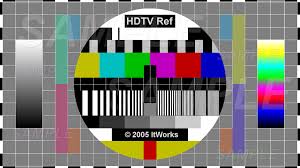
Now it’s time to put this information all together. The HDCP-protected content will not output on a display that does not include HDCP unlocking. This means if you hook up an HD-DVD player to your plasma display with component cables, everything will look fine. But when you hook it up with HDMI cables, if your plasma doesn’t have HDCP support, nothing will play at all (whereas if it does have HDCP support, it will look better than the component cables). The good news is most consumer-grade LCD and plasma displays sold in the past few years have HDCP support built-in, and everything should work fine.

With the next-generations of media PCs, cable boxes, satellite receivers, DVRs, DVD players, and game consoles all offering HDTV services, the future has literally never looked so good. While there is no real winner or loser in the HDMI/DVI space, it seems extremely likely that HDMI is bound to be the dominant cable format for the next few years. Especially because it supports up to 10.2 gigabits per second throughput (that is a LOT of data) and has built-in HDCP support for the content industry. Although with all that fancy technology inside, the nicest part for consumers is finally having the convenience of only making a single connection from device to device!

More reading:

  • The official HDMI web site
  • HDCP basics
  • HDNet TV service
  • HD Beat HDTV blog

My current picks for HDTV gear:

  • For the absolute best option, with no price limitations, get a Pioneer Elite plasma – any size will be good. Year after year they are, as the wise Tina Turner once said, simply the best
  • For a great midrange choice, check out Panasonic PX-60/600 series plasma or Samsung LN-S series LCD – both consistently get good marks from consumers
  • For the absolute best bang for the buck, get the Syntax Olevia LT32HVM (or LT32HVE) 32” LCD – I like it so much, I have one at home!
  • Do NOT forget to budget in cables, TV stands (or wall mounts), and shipping costs (if buying online) when shopping for HDTV. Also, check in with the local cable and satellite companies to understand all the available options for your area!

Good luck, and welcome to the HD club!

Posted in General, Guides, Video/Music/Media | 2 Comments |

I'm living in perfect Harmony!

Posted on June 28, 2006 by Jeremy Toeman

Harmony vs the pile of remotesI first saw the Logitech Harmony remote back when they were a small Canadian company, demonstrating it at a trade show a couple of years ago.  Their initial demos focused on giving EPG functionality to a LCD screen on the remote, but thankfully they made a switch into offering what I will have to call the best damn remote control on Earth.  Then Logitech bought them, and 2 years later they’ve managed to not screw it up!  Is the Harmony 880 perfect?  Nope, but it’s as close as I’ve seen.

In my mess of living room devices are the following:

  • Sony AV receiver
  • Syntax Olevia LCD TV
  • Motorola HD DVR cable box (DCT-6412 Mark III)
  • Moviebeam
  • Samsung DVD player (with HD upscaling)
  • 2 Slingboxes
  • Xbox (no 360 yet)
  • Sonos
  • Gefen 4×1 HDMI switch

Harmony vs the pile of remotesI have a lot of remotes – 6 of them to be precise.  I’ve connected the video for the Moviebeam, DVD player, and DVR to the Gefen switch, which is connected to the LCD.  All audio runs directly through the Sony receiver.  Changing inputs requires 2 remotes, and then I need the actual device remote.  As of about 2 hours ago, I only need one remote now, the Harmony 880.

The Harmony is shipped in Logitech’s signature green packaging (with a nice bubble exposure to show the actual unit), although I almost lost a finger trying to open the thing.  it comes with a docking station, a rechargable battery, a USB cable, a quick start guide, and the setup software.  After the initial charge was complete, I moved right into setup.

Harmony packagingHarmony packagingHarmony in cradleHarmony in cradleHarmony vs the pile of remotesHarmony vs the pile of remotes

Harmony vs the pile of remotesFirst step was to download and install the Harmony software (easy, but I’d rather not have had to register just to do it).  A few minutes later I followed the very intuitive step-by-step setup wizard, and within about 10 minutes everything other than the Gefen switch and Moviebeam were in my devices list.  You may be wondering why I was using my laptop to configure my remote control, but trust me when I say it’s worth it.  I’ve tried many many different programmable remotes over the years, and they are all awful (yes, especially including the horrific Pronto from Philips).  Whether its entering bizarre 4-digit codes or worse yet, pointing two remotes at each other and pushing buttons in odd sequences to ‘learn’ functions, the experience is always bad.  Enter Harmony and the PC.

Harmony vs the pile of remotesIn the PC setup wizard, you simply identify the devices you own by category: TV, DVD player, DVR, etc.  All you need to know is the make and model, they have it in their database (although I’ll explain later what happens if they don’t – but don’t worry, they do).  The software then uses USB to automatically program the appropriate infrared signals into the Harmony for you.  Done.  Game over!

Harmony GUIAnd that’s when Harmony starts getting cool.  They also have the concept of ‘activities’.  An activity is “watch TV”.  When I push the “watch TV activity” on the screen of the remote, it automatically performs a macro (a series of commands) to turn on my TV (if its off), switch it to the right input, turn on my Sony receiver, switch it to the right input, and turn on my cable box.  Automatically.  Best part is this: at the end of the macro, the remote asks you if it worked properly, and if it doesn’t, it helps you get it working right!  The on-screen instructions take you question by question to identify the problem (which can happen if you don’t leave the remote pointed in the right direction long enough, something I did a few times while getting used to it).  The screens below reflect the key steps in an activity:

Harmony GUIHarmony GUIHarmony GUIHarmony GUIHarmony GUI

Harmony vs the pile of remotesAlso nice in the system is the ability to rename devices, create channel shortcuts, and have discrete volume control (when I push volume up or mute, it affects the Sony receiver, not the Comcast cable box).  Altogether a great experience.

Harmony GUIHarmony GUIHarmony GUIHarmony GUI

With all of the glowing remarks above, I will say it’s not without it’s faults.  While I didn’t have the same problems as Steven did, I found the PC software has a lot of clunkiness to it.  When setting up the ‘activity’ to control Moviebeam, for example, I couldn’t get it to accept the concept that my Samsung DVD player doesn’t need to do anything for Moviebeam to work (I did eventually find a manual override, but it was buried deep within the user interface).  Also, integrating the Gefen 4×1 HDMI switch was much harder work than it should have been (not due to Gefen, but because Harmony doesn’t have the concept of separate audio and video switching).  Finally, the software requires a lot more confirmations and clicking ‘next’ a lot than I think is really needed – I would like to see an ‘advanced users’ version that gives you more direct control over the system (obviously this should be an optional mode, but it should be there somewhere).

There are also a few snags in the physical design of the 880.  For example, the playback controls are not distinct in shape, size, or layout, so until you learn that ‘play’ is the upper right button, you’ll never go there instinctively (but the backlight ‘glow’ effect of the remote almost makes up for this).  Also the volume and channel change buttons are a little tricky to get comfortable with.  Finally, there’s no ‘cancel’ button to exit out of the help or other interactive screens.

Harmony vs the pile of remotesBut these complaints are really just minor nuisances.  If you own 3 or more living room gadgets, grab a Harmony.  Think I’m the only one who likes it?  Check out Bombippy, Keith, and DigitalGrabber for some other reviews (nope, don’t know any of em).  Without any further hesitation, I’m declaring the Logitech Harmony 880 absolutely LD Approved!

LD Approved

Posted in Convergence, General, LD Approved, Product Reviews, Video/Music/Media | 7 Comments |
« Previous Page
Next Page »

About

Jeremy Toeman is a seasoned Product leader with over 20 years experience in the convergence of digital media, mobile entertainment, social entertainment, smart TV and consumer technology. Prior ventures and projects include CNET, Viggle/Dijit/Nextguide, Sling Media, VUDU, Clicker, DivX, Rovi, Mediabolic, Boxee, and many other consumer technology companies. This blog represents his personal opinion and outlook on things.

Recent Posts

  • Back on the wagon/horse?
  • 11 Tips for Startups Pitching Big Companies
  • CES 2016: A New Role
  • Everything I Learned (So Far) Working For a Huge Company
  • And I’m Back…

Archives

Pages

  • About

Archives

  • January 2019
  • April 2016
  • January 2016
  • December 2015
  • June 2015
  • May 2015
  • April 2015
  • March 2015
  • February 2015
  • January 2015
  • December 2014
  • November 2014
  • October 2014
  • September 2014
  • August 2014
  • June 2014
  • May 2014
  • April 2014
  • March 2014
  • January 2014
  • December 2013
  • September 2013
  • August 2013
  • July 2013
  • May 2013
  • February 2013
  • January 2013
  • December 2012
  • October 2012
  • September 2012
  • August 2012
  • May 2012
  • April 2012
  • March 2012
  • February 2012
  • January 2012
  • December 2011
  • November 2011
  • October 2011
  • September 2011
  • August 2011
  • June 2011
  • March 2011
  • February 2011
  • January 2011
  • December 2010
  • November 2010
  • October 2010
  • September 2010
  • August 2010
  • July 2010
  • June 2010
  • May 2010
  • April 2010
  • March 2010
  • February 2010
  • January 2010
  • December 2009
  • October 2009
  • September 2009
  • August 2009
  • July 2009
  • June 2009
  • May 2009
  • April 2009
  • March 2009
  • February 2009
  • January 2009
  • December 2008
  • November 2008
  • October 2008
  • September 2008
  • August 2008
  • July 2008
  • June 2008
  • May 2008
  • April 2008
  • March 2008
  • February 2008
  • January 2008
  • December 2007
  • November 2007
  • October 2007
  • September 2007
  • August 2007
  • July 2007
  • June 2007
  • May 2007
  • April 2007
  • March 2007
  • February 2007
  • January 2007
  • December 2006
  • November 2006
  • October 2006
  • September 2006
  • August 2006
  • July 2006
  • June 2006
  • May 2006
  • April 2006
  • March 2006
  • February 2006
  • January 2006
  • December 2005
  • November 2005
  • October 2005
  • September 2005
  • August 2005
  • July 2005
  • June 2005
  • May 2005
  • April 2005
  • March 2005
  • February 2005
  • January 2005
  • December 2004
  • November 2004
  • October 2004
  • September 2004

Categories

  • Convergence (81)
  • Gadgets (144)
  • Gaming (19)
  • General (999)
  • Guides (35)
  • LD Approved (72)
  • Marketing (23)
  • Mobile Technology (111)
  • Networking (22)
  • No/Low-tech (64)
  • Product Announcements (85)
  • Product Reviews (109)
  • That's Janky (93)
  • Travel (29)
  • Video/Music/Media (115)
  • Web/Internet (103)

WordPress

  • Log in
  • WordPress

CyberChimps WordPress Themes

© LIVEdigitally